

System design is the round that trips up the most candidates, including experienced engineers who code well.
Not because the concepts are impossible to learn. But because most candidates prepare the wrong way: they read about systems instead of designing them, and they learn vocabulary without building judgment.
This guide covers everything you need to prepare for a system design interview from the ground up, the concepts to understand, the problems to practice, the framework to follow in every session, and what interviewers are actually evaluating when they watch you design.
TL;DR - What You Need to Pass a System Design Interview
- Understand 10-12 core infrastructure concepts deeply (not just by name)
- Practice designing 6-8 full systems end-to-end, not just reading solutions
- Follow a consistent answer structure in every session
- Communicate tradeoffs explicitly-interviewers reward reasoning, not just answers
- Do at least 2 mock sessions with structured feedback before your real loop
What Is a System Design Interview?
A system design interview is an open-ended technical discussion where you're asked to design a large-scale software system from scratch, usually in 45–60 minutes.
Common prompts look like:
- "Design Twitter's feed"
- "Design a URL shortener like TinyURL"
- "Design WhatsApp"
- "Design YouTube"
There's no single correct answer. Interviewers are evaluating your engineering judgment: how you break down a vague problem, which components you choose and why, how you handle scale, and how clearly you explain your reasoning.

The 12 Core Concepts You Must Understand
These building blocks appear in virtually every system design question. Don't just know the term, know when to use each, and what it costs.
1. Horizontal vs. Vertical Scaling
Vertical scaling means giving one machine more power. Horizontal scaling means adding more machines. Horizontal scaling is the foundation of every large system, it removes single points of failure and allows near-infinite scale, but adds complexity around state management and coordination.
2. Load Balancers
Distribute incoming traffic across multiple servers. Strategies include round robin, least connections, and consistent hashing. Consistent hashing is critical for stateful services and distributed caches, it minimises cache misses when nodes are added or removed.
3. SQL vs. NoSQL
SQL databases give you strong consistency, structured schemas, and mature tooling. NoSQL trades some consistency for horizontal scalability and flexible schemas. The right choice depends on read/write patterns, consistency requirements, and how structured your data is.

4. Caching
Caches sit between your application and your database to serve frequent reads faster. Key decisions: where to cache (client, CDN, application, database), what eviction policy to use (LRU, LFU, TTL), and how to handle cache invalidation when underlying data changes.
5. Message Queues
Asynchronous communication between services. Instead of Service A waiting for Service B to respond, A puts a message on a queue and B processes it when ready. Kafka and RabbitMQ are common choices. Critical for decoupling services, handling traffic spikes, and guaranteeing at-least-once delivery.
6. CDN (Content Delivery Network)
Distributes static assets (images, videos, JS files) to edge servers geographically closer to the user. Reduces latency significantly for read-heavy, globally distributed applications like video streaming or e-commerce.
7. Database Sharding
Partitioning a large database horizontally across multiple machines, each shard holds a subset of the data. Enables horizontal scaling of your database layer. Key challenge: choosing a shard key that avoids hotspots (where one shard receives disproportionately more traffic than others).
8. Database Replication
Copying data across multiple database servers. Primary-replica setups have one write node and multiple read nodes, improves read performance and provides failover capability. Multi-primary setups allow writes across nodes but introduce conflict resolution complexity.
9. CAP Theorem
A distributed system can guarantee at most two of three: Consistency (every read gets the latest write), Availability (every request gets a response), Partition Tolerance (the system works despite network failures). Since partition tolerance is non-negotiable in distributed systems, you're always choosing between consistency and availability.
10. Rate Limiting
Controls how many requests a client can make in a given time window. Protects against abuse and keeps downstream services from being overwhelmed. Common algorithms: token bucket (allows short bursts), sliding window counter (smooth rate enforcement), leaky bucket (consistent output rate).
11. API Design
RESTful APIs are the standard. Key considerations: pagination for large result sets, versioning strategies, idempotency for write operations, and how you handle authentication (OAuth, API keys, JWT).
12. Microservices vs. Monolith
Monoliths are simpler to develop and deploy early. Microservices allow teams to scale and deploy independently but add operational complexity. Don't suggest microservices reflexively, know when the tradeoff is worth it.
The 8 System Design Problems You Must Practice
Practice these by actually designing them, not just reading solutions:
1. URL Shortener (e.g., TinyURL) Core decisions: hashing strategy, database choice, redirection mechanism, analytics. Simpler surface area, reveals a lot about your thinking on data storage and encoding.
2. Social Media Feed (Twitter/Instagram) Core decisions: fan-out on write vs. fan-out on read, timeline generation, caching hot users, handling celebrities. One of the most commonly asked problems across all FAANG companies.
3. Chat Application (WhatsApp/Slack) Core decisions: WebSocket connections, message storage, delivery guarantees (at-least-once vs. exactly-once), group messaging at scale.
4. Ride-Sharing Backend (Uber/Ola) Core decisions: geolocation indexing, real-time driver-rider matching, surge pricing calculation, trip state management.
5. Video Streaming Platform (YouTube/Netflix) Core decisions: video upload and transcoding pipeline, adaptive bitrate streaming, CDN strategy, search and recommendation at scale.
6. Search Autocomplete Core decisions: trie vs. database approach, ranking by frequency and relevance, latency requirements, personalisation.
7. Distributed Rate Limiter Core decisions: token bucket vs. sliding window, distributed state management, Redis-backed implementation, handling edge cases across multiple servers.
8. Notification Service Core decisions: push vs. pull, fan-out across channels (email, SMS, push), retry logic, priority queuing, deduplication.
The Framework to Follow in Every System Design Session
A consistent structure signals maturity and keeps you from going too deep too fast.
Step 1 - Clarify Requirements (5 minutes) Ask what features matter and what scale you're designing for. Don't assume.
Questions to ask:
- How many daily active users?
- What are the most critical features vs. nice-to-haves?
- Is this read-heavy or write-heavy?
- Do we need global distribution or single-region?
Step 2 - State Your Assumptions (1–2 minutes) Make your constraints explicit. "I'm assuming 100M DAU, primarily read traffic, and we can tolerate eventual consistency for the feed."
Step 3 - Estimate Scale (3–5 minutes) Back-of-envelope calculations show you think in numbers:
- Daily active users → requests per second
- Data per request → storage per day/year
- Read/write ratio
Step 4 - High-Level Architecture (5 minutes) Draw the major components and how data flows between them. Don't go deep yet.
Step 5 - Deep Dive on Key Components (15–20 minutes) Pick 2–3 components to go deep on. Choose the most interesting tradeoffs or the ones the interviewer probes on.
Step 6 - Surface Tradeoffs Explicitly (throughout) Don't hide complexity. Say "I chose NoSQL here because the access pattern is simple key-value lookups and we need horizontal scale, the downside is we lose strong consistency, which I'd mitigate by..."
Step 7 - Identify Failure Modes (5 minutes) What breaks first at scale? Single points of failure? Network partitions? Database hotspots? How do you handle each?
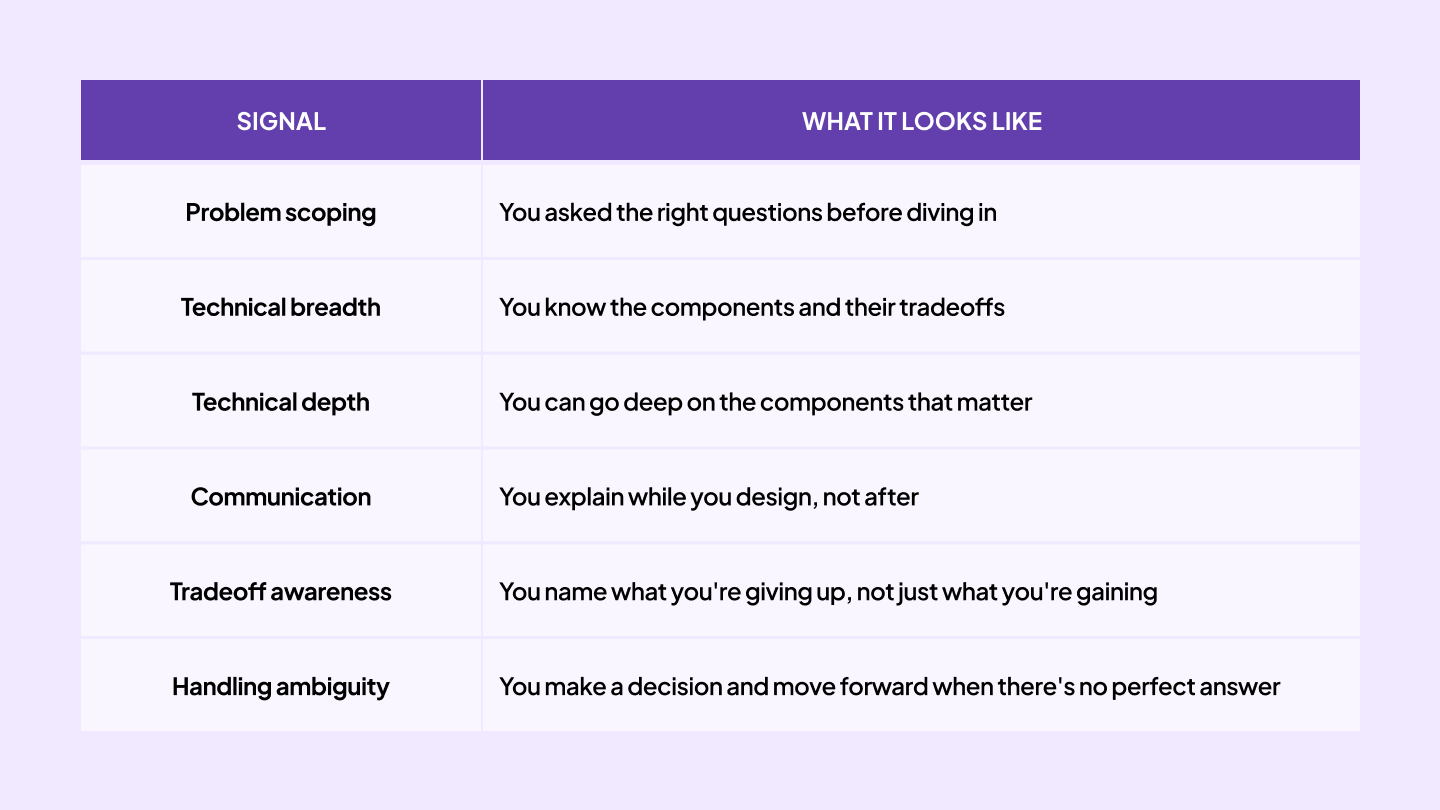
What Interviewers Are Actually Scoring
Understanding the rubric changes how you prepare:
How Mock Interviews Accelerate System Design Prep
Reading about system design builds vocabulary. Designing in front of a real person under time pressure builds the skill the interview actually tests.
The candidates who struggle most in system design rounds are the ones who've read everything but never drawn a diagram while someone is watching and asking follow-up questions.
At Intervue.io, system design mock sessions are conducted by experienced engineers. You get structured feedback on your scoping, your architecture, your depth on components, and your communication, specific enough to know exactly what to fix before the real thing.
👉 Practice system design on Intervue.io
FAQs
How long should I spend on system design preparation? Dedicate 2–3 weeks specifically to system design, starting in weeks 7–9 of a 12-week prep plan. Spend the first week building conceptual understanding, then move to practicing full designs end-to-end.
What's the most common system design mistake? Jumping to a solution before scoping the problem. Interviewers consistently penalise candidates who start drawing diagrams before asking a single clarifying question. Always scope first.
Do I need to know specific technologies like Kafka or Redis? You should know what they do and when to use them — not how to configure them. Interviewers are evaluating your architectural judgment, not your DevOps knowledge.
How detailed should my system design answer be? Cover breadth first (all major components), then go deep on the 2–3 that matter most. A design that covers everything shallowly is weaker than one that goes deep where it counts.
Is system design different for senior vs. junior roles? Yes. Junior candidates are expected to cover basics and show they understand components. Senior candidates are expected to lead the discussion, proactively raise tradeoffs, and go deeper on failure modes and operational concerns.